New week, new classroom Photo Apps!

Two buzz-worthy discoveries for Photo teachers this month:

New Phone app: OKDOTHIS
New Website: Exposure.so


Ok Do this is a photo-sharing app that creates a new spin on taking images. The idea is simple, to  "get rid of creative block". See interface and video below.

I found the app is easy to use and a great resource for the lesson ideas.  Even if students don't have a smart phone device, the categories can be used as in class photo prompts for shooting assignments...plain and simple: well worth the $2.00 download fee!
Check out interface samples below.


Exposure.so is a photo-narrative website that allows users to create simple blog like posts + text.
{3 for free}
Great tool for photo-journaling, or iPhone based photo essay assignment.


A former photo student shared the news of feature on the site this morning, couldn't wait to pass it along.

Check out his photo essay on the Staff pick page: MATTHEW KALAPUCH

Have fun!

Feel free to comment or share you discoveries with us!

Student Gallery Display // Advanced Photography Fall 2013


Over the course of 4 weeks, students enrolled in the Advanced Photography course are required to develop a Breadth and Concentration Portfolio. During this portfolio process, students are provided with a list and are required to venture to new places and take photos with a theme in mind. Images are edited, students begin to self-reflect, and reshoot if need be.
From photoshop process to printing students begin to understand many aspects of the artist process as high school students.

1st display this year: a few samples from the Advanced High school exhibit. :)


Tierney Riccio, Grade 12
 Graffiti & Transportation


Haley Kaczka, Grade 12
The Outdoors


Ashley Maselli, Grade 12
Ayita


Melanie Santos, Grade 12
Raindrops


Raychel Frye, Grade 11
Home away from home


Tylin Tissenker, Grade 12
Drenched Flesh


Gabriella Battaglio, Grade 12
The street


Haley Abruzzese, Grade 12
Signs, Wood and other things


Digital Photography Lesson// Color


Medium: Adobe Photoshop
Time: 1-3 days {One day dedicated to class demo and practice shooting} 
Grade: 9-12 
Objective: Develop a basic understanding of the Rule of Thirds
Photograph, capture & explore compositional rule of thirds. 
Materials: Digital camera/Photoshop

See more power points by Refrigeratorgood: SLIDE SHARE <--Click here


* All photographs shown below are taken by the following BTHS students  2013 grade 9-12: 
[see below] [Nicole H.] [Kristianna.] [Kristi K.] [Meg D.]  [Jacyln P.] 

www.refrigeratorgood.com


      Teacher: Meredith Hudson
      Class: Digital Photo I
      Grade: 9-12
      State: NJ
      Teachers Blog: [Website]


Rule of Thirds // Digital Photography lesson

Medium: Adobe Photoshop
Time: 1-3 days {One day dedicated to class demo and practice shooting} 
Grade: 9-12 
Objective: Develop a basic understanding of the Rule of Thirds
Photograph, capture & explore compositional rule of thirds. 
Materials: Digital camera/Photoshop

See more power points by Refrigeratorgood: SLIDE SHARE <--Click here


* All photographs shown below are taken by the following BTHS students  2013 grade 9-12: 
[see below] [Tara D.] [Chris D.] [Tori H.] [Mel J.]  [Jess C.] [Kristiana.] 
www.refrigeratorgood.com


      Teacher: Meredith Hudson
      Class: Digital Photo I
      Grade: 9-12
      State: NJ
      Teachers Blog: [Website]


High School Photography Lesson // Lines & Shape


Medium: Adobe Photoshop
Time: 1-3 days {One day dedicated to class demo and practice shooting} 
Grade: 9-12 
Objective: Develop a basic understanding of the Art Element Line & Shape 
Photograph, capture & explore various lines and shapes. Incorporating knowledge of --> rule of thirds and angle of view.
Materials: Digital camera/Photoshop

See more power points by Refrigeratorgood: SLIDE SHARE <--Click here


* All photographs shown below are taken by the following BTHS students  2013 grade 9-12: [see below] [Tylin T.] [Tierney R.] [Angie W.] [Nikki P.] 

www.refrigeratorgood.com


      Teacher: Meredith Hudson
      Class: Digital Photo I
      Grade: 9-12
      State: NJ
      Teachers Blog: [Website]


Texture // Digital Photography Lesson


Medium: Adobe Photoshop
Time: 1-3 days {One day dedicated to class demo and practice shooting} 
Grade: 9-12 
Objective: Develop a basic understanding of the Art Element Texture 
Photograph, capture & explore various natural textures
Materials: Digital camera/Photoshop

Tip: For this lesson I allow students to use Macro mode or auto focus. Composition in addition to Capturing texture is key. I encourage students to photograph outside and to steer clear of what I refer to as 2-d synthetic textures {graphic tees, linoleum flooring, clothing patterns etc.}
*students are already familiar with color correction techniques, dodging and burning and contrast corrections

New feature for my Photo lessons posts: my POWER-POINTS! 
My Power-points are also available on Slide share, see below. Most of the images are sourced from previous student photographs and or google. I find it extremely helpful to show work from previous semesters, the images help to boost the confidence of  current students before sending them off to 
shoot :)

See link Refrigeratorgoods: SLIDE SHARE <--Click here


* All photographs shown below are taken by the following BTHS students  2013 grade 9-12: [see below] [Chris D.] [Paul B.] [Kyle B.] [Gianna B.] [Nick F.] [Laura O.] [Kristiana ] [Kristi K.] [Jacyln P.] [Amanda]
www.refrigeratorgood.com


      Teacher: Meredith Hudson
      Class: Digital Photo I
      Grade: 9-12
      State: NJ
      Teachers Blog: [Website]

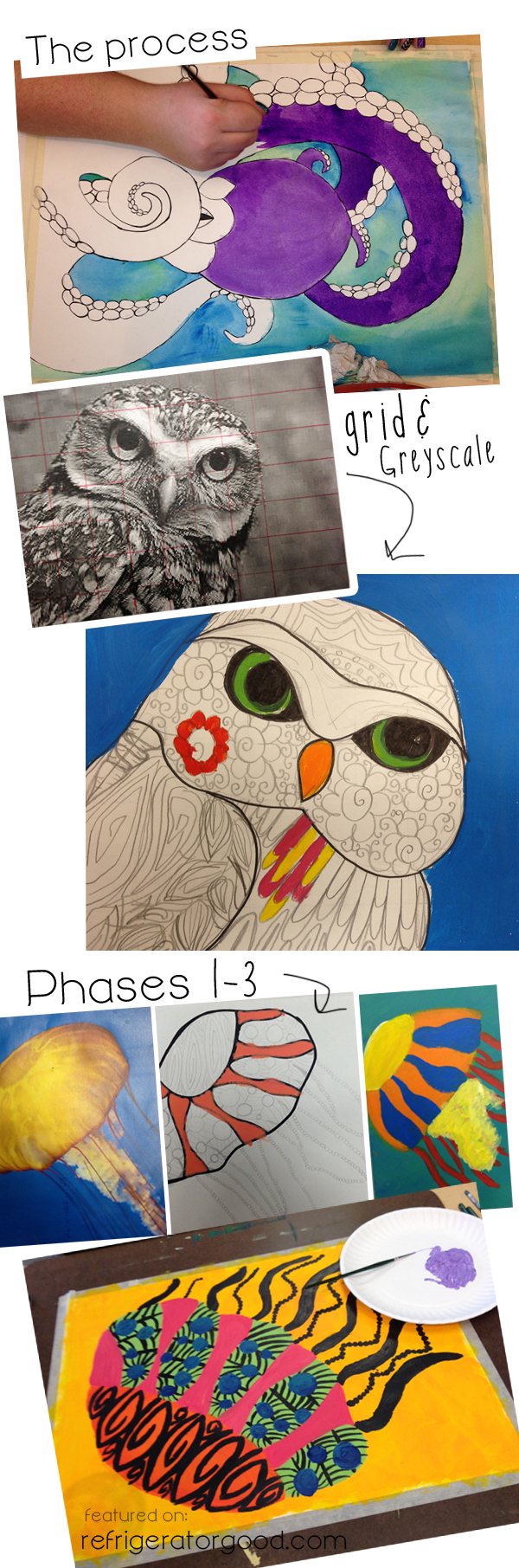
Middle & High School Painting I // Decorative Line Animals


Medium: Acrylic painting
Time: 1-2 weeks
Grade: 9-12  Art II: Intermediate Art class
Objective: Explore impressionism, painting and color
Materials: Canvas, acrylic paint, brushes, water, paper towel.

The Following Lesson is provided by:
ART EDUCATOR: Sabrina Wingren, Spokane Valley, Washington


*CHECK OUT ADDITIONAL LESSON's on Sabrina's Teaching BLOG!*

Sabrina's Teaching Blog: A SPACE TO CREATE.COM {Click here}

Sabrina's High School site: {Click here}
Sabrina's lesson is also available for purchase on her Teacher pay Teacher account: {click here}


www.refrigeratorgood.com
Sabrina's Instructional Technique: "I have students look up an animal of their choice online and have them print it in color and in grayscale. I have them grid the grayscale printout and their final surface. I talk to them about not using paint directly from the tube, but mixing their colors. I also talk about color bias and give the paint accordingly. They do a color plan and a small scale test of colors on a scrap piece of paper before beginning. We talk about rhythm and line and do some Zentangles as a precursor to this lesson." Sabrina Wingren


www.refrigeratorgood.com


      Teacher: Sabrina Wingren
      Class: Art I
      Grade: 6-12
      State: Washington
      Teachers Blog: [Website]

Pin It button on image hover