Think like Artists throughout the learning process

What would it look like if twenty percent of our time in a school setting was dedicated to exploring and learning about things that interest us? What would it feel as educators if this was embedded into our work week?
 
What shifts would need to occur for us to encourage students and staff to document their individual learning processes and provide them with the tools in order to do so? The result is worth the effort and would yield a grander authentic audience with an endless supply of ongoing educational inspiration.

Documentation of "process" is not a foreign concept to society. Artists did not keep their paintings locked in studios but instead shared the product for others to see. As a result, a domino effect of inspiration ensued. The exposure to artist products and "documentation" resulted in others beginning to think as a result of the art they experienced.
 
In the post-pandemic world, we have an opportunity to shift the focus from What we learn to How we know, all while having the ability to share and inspire others. Over the last two and half years, technology and its impact on communication have pushed the boundaries of class learning and work environments. The key for us now as educators now find ways to use the changes in communication to provide ownership and depth within our learning our educational communities today as we transition to in-person settings. The quicker we recognize that we must move from a "require" mindset to a "desire" mindset for students, teachers and school leaders will be able to successfully promote & create opportunities for students to explore and develop their strengths and interests.
 
If we think like artists and harvest our interest as we strengthen our craft, we have endless opportunities to inspire others as we share our learning with the world.


New Lens -Same blogspace

In 2013, I was seven years into my teaching career and interested in creating a space for sharing and collaborating with colleagues globally. This is where this blog, Refrigeratorgood.com, was born. The blog became a space for me to connect and share lessons with my learning community and fellow educators I had never met across the nation. I did not know how to build a website, design custom widgets, or read HTML code at the site's creation. I remember spending hours researching websites and reading about the "how-to's" of web design. Watching the site grow taught me that it's not the product but the process that allows us to learn about ourselves and makes us grow as educators and leaders. 

Fast forward. Nearly a decade later, I transitioned to a new district and worked in different schools within my new school district, serving in three vastly different roles. My experiences ranged from a High School Teacher, Varsity Coach, Assistant Principal, and Elementary School Principal. Truth is, if it weren't for the skills I obtained through creating this site, I don't know that my professional path would be the same.

When we are not with our students, as educators, ninety percent of our time is spent reflecting, listening, and searching for ways to do things better. The educational leadership market is saturated with fantastic literature, podcasts, and TED talks. Still, most recently, I love the statements and questions posed by well-renowned superintendent Joe Sanfelippo. He states, "When we say we are just a teacher, we devalue our work and allow others to do the same." He points out that it is up to the educator to share their narrative before others write it for us. Sanfelippo poses the following question in many of his talks, "What tools do you use as educators, and where do you find the time?" The tools are all around us; we just need to remind ourselves that we have the confidence to dip our toes into uncharted water. We will continue to find out what we are capable of and what the learning "process" will teach us about ourselves.

Thank you to the mentors and leaders who provide the extra push to get back into the water and revisit the process @@DrGeorge_MU

Displaying student work

Displaying student work, is one of the most important aspects of a successful art program within a school. Over the years I have found that students enjoy the process of mounting, hanging and naming their class displays. In my early years of teaching,  I would label and hang the work myself, but as time went on I realized that the students loved selecting the pieces and deciding how they would be displayed as a class. Allowing them to have more ownership over the display process seems to provide them a sense of pride once the work is hung...followed by a traditional group photo.


Photoshop Tutorials for Photo I Course

Looking for a basic intro lessons for a Photography I course:
Below are four tutorials I created for an intro I class.

Medium: Adobe Photoshop
Time: 1-2 days {One day dedicated to class demo and practice editing} 
Grade: 9-12 
Objective: Develop a basic understanding of Photoshop Processing
Materials: Photoshop & Sample images provided by teacher or students

I typically introduce my photoshop basic editing tutorials in the following sequence:
  • Intro to Color correction
  • Intro to Basic Color Edit
  • Color Selection
  • Dodge and Burn

Lesson: Intro to Black and White editing in photoshop
1. Go to layers palette--> Duplicate layer
2. Go to --> "Black and white cookie" -Adjust LEVELS
3. Go to --> "Black and white cookie"Adjust COLOR BALANCE
4. Go to --> "Black and white cookie"Adjust Brightness and Contrast
   *You can modify adjustment layer by painting on it with a black brush.
5. Dodge and Burn {only if needed}


Lesson: Intro to Color selection or "color pop"
1. Command+J
2. Create a black and white mask above you duplicated image
3. Using a black paintbrush, paint on the layer mask {the areas you want to come back in color}
4. If you mess up you can use a white brush to bring it back.


Lesson: Intro to Hue and Saturation adjustment layer 
1. Go to layers palette--> Duplicate layer
2. Go to --> "Black and white cookie" -Adjust Levels
3. Go to --> "Black and white cookie"Adjust Hue and Saturatoin
4. Go to --> "Black and white cookie"Adjust Brightness and Contrast
   *You can modify adjustment layer by painting on it with a black brush.
5. Dodge and Burn {only if needed}


Lesson:  Intro to Dodging and Burning
1. Go to Layers palette-->Duplicate layer by hitting -->Command + J
2. Go to--Layer-->New Layer
3. Select Overlay {CHECK OFF, fill with 50 grey}
4. Dodge and Burn on the new layer

Coming soon... RG Video series!

The beauty of teaching is that with each year new exciting expectations come about. In my experience, most school districts roll out district initiatives every couple of years. In my district we adopted the use of Google Classroom/Drive! 


After attending two google workshops this spring and basking in sensory tech overload I will simplify one of my new favorite classroom applications called Screencastify. The app allows you to record your desktop and embed the video on google drive or other video sharing application. The perk of the app is that it is compatible with google drive..which means easy saving, linking and posting to google classroom!

Excuse the audio.. (still working out the kinks) Stay tuned for a new video series that aims to help photography one teachers with the basics of photoshop.


Lesson: Basic Color edit
1. Go to layers palette--> Duplicate layer
2. Go to --> "Black and white cookie" -Adjust LEVELS
3. Go to --> "Black and white cookie"Adjust COLOR BALANCE
4. Go to --> "Black and white cookie"Adjust Brightness and Contrast
   *You can modify adjustment layer by painting on it with a black brush.
5. Dodge and Burn {only if needed}

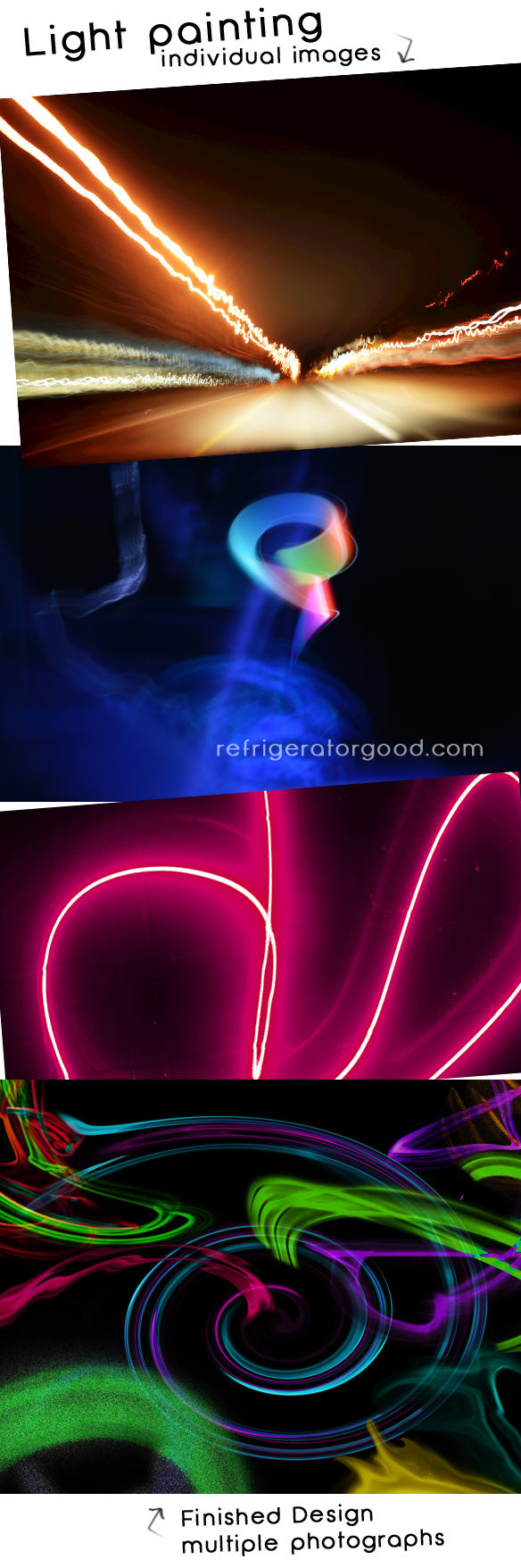
Digital Photography Lesson // Abstract Light Designs


Medium: Adobe Photoshop
Time: 1-2 days {One day dedicated to class demo and practice shooting} 
Grade: 9-12 
Objective: Develop a basic understanding of Shutter Priority Mode to light paint
Create an abstract design using Multiple light painting images
Materials: Digital camera/Photoshop

The focus of this lesson is to master the use of slow shutter speeds to create light pairing images.  
Using a dark room, students use their the students use their iPhones as a light source and work in pairs to generate abstract light images in a dark room. The images are then edited in photoshop and combined onto one NEW photoshop file.  This unit usually peaks the interest of most students and is a great warm up to the stop motion lesson.

Untitled


Below is the Step by Step guide for creating on composite abstract design in Photoshop:
Post tutorial, I print out a copy of these directions for students to use while working at their own pace.


1. Edit your shutter images using: Brightness/Contrast and Hue and saturation.


 -->save edits as .JPGS or merge the adjustments


2. Make a new Photoshop Document:
           FILE NEW> 8.5 by 11, 300 resolution. BACKGROUND COLOR BLACK


3. Paint bucket the background of the new document black.


4. Select a soft edge brush and lower the opacity to less than 75%


5. Open edited shutter image. {Make sure it is .jpg} {Make sure they are merged command+E}


6. Click on Quick mask option in tool box


7. With your brush {soft edge-75% opacity} paint on your shutter image


6. Click BACK ON Quick mask option in tool box


7. Your selection should appear {marching ants}


8. GO TO TOOL BAR > SELECT INVERSE


9. Go to move tool, mouse over selection, click on it. Drag it and drop it to new black document.


10. To change the size of the shutter image on the new document: HIT command+T

11. Repeat steps 4-9.


      Teacher: Meredith Hudson
      Class: Digital Photo I
      Grade: 9-12
      State: NJ
      Teachers Blog: [Website]


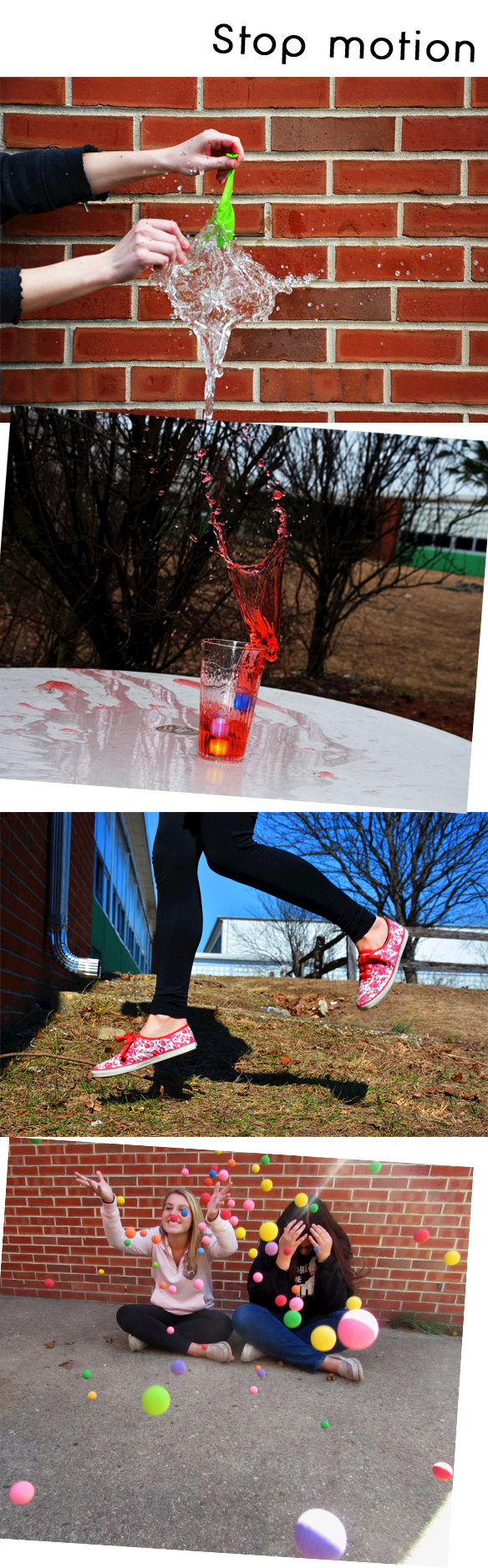
Digital Photography Lesson// Shutter speed


Medium: Adobe Photoshop
Time: 1-2 days {One day dedicated to class demo and practice shooting} 
Grade: 9-12 
Objective: Develop a basic understanding of Shutter Priority Mode
Photograph, capture & stop motion photography.
Materials: Digital camera/Photoshop

I typically introduce Shutter speed as a unit. One light painting lesson {1-2 days], followed by stop motion photography. Both lessons focus on mastering the use of Shutter Priority mode. 
Students are encouraged to experiment in pairs with their own "stop action" compositions and subjects.


shutterspeed


      Teacher: Meredith Hudson
      Class: Digital Photo I
      Grade: 9-12
      State: NJ
      Teachers Blog: [Website]


New week, new classroom Photo Apps!

Two buzz-worthy discoveries for Photo teachers this month:

New Phone app: OKDOTHIS
New Website: Exposure.so


Ok Do this is a photo-sharing app that creates a new spin on taking images. The idea is simple, to  "get rid of creative block". See interface and video below.

I found the app is easy to use and a great resource for the lesson ideas.  Even if students don't have a smart phone device, the categories can be used as in class photo prompts for shooting assignments...plain and simple: well worth the $2.00 download fee!
Check out interface samples below.


Exposure.so is a photo-narrative website that allows users to create simple blog like posts + text.
{3 for free}
Great tool for photo-journaling, or iPhone based photo essay assignment.


A former photo student shared the news of feature on the site this morning, couldn't wait to pass it along.

Check out his photo essay on the Staff pick page: MATTHEW KALAPUCH

Have fun!

Feel free to comment or share you discoveries with us!

Student Gallery Display // Advanced Photography Fall 2013


Over the course of 4 weeks, students enrolled in the Advanced Photography course are required to develop a Breadth and Concentration Portfolio. During this portfolio process, students are provided with a list and are required to venture to new places and take photos with a theme in mind. Images are edited, students begin to self-reflect, and reshoot if need be.
From photoshop process to printing students begin to understand many aspects of the artist process as high school students.

1st display this year: a few samples from the Advanced High school exhibit. :)


Tierney Riccio, Grade 12
 Graffiti & Transportation


Haley Kaczka, Grade 12
The Outdoors


Ashley Maselli, Grade 12
Ayita


Melanie Santos, Grade 12
Raindrops


Raychel Frye, Grade 11
Home away from home


Tylin Tissenker, Grade 12
Drenched Flesh


Gabriella Battaglio, Grade 12
The street


Haley Abruzzese, Grade 12
Signs, Wood and other things


Digital Photography Lesson// Color


Medium: Adobe Photoshop
Time: 1-3 days {One day dedicated to class demo and practice shooting} 
Grade: 9-12 
Objective: Develop a basic understanding of the Rule of Thirds
Photograph, capture & explore compositional rule of thirds. 
Materials: Digital camera/Photoshop

See more power points by Refrigeratorgood: SLIDE SHARE <--Click here


* All photographs shown below are taken by the following BTHS students  2013 grade 9-12: 
[see below] [Nicole H.] [Kristianna.] [Kristi K.] [Meg D.]  [Jacyln P.] 

www.refrigeratorgood.com


      Teacher: Meredith Hudson
      Class: Digital Photo I
      Grade: 9-12
      State: NJ
      Teachers Blog: [Website]


Rule of Thirds // Digital Photography lesson

Medium: Adobe Photoshop
Time: 1-3 days {One day dedicated to class demo and practice shooting} 
Grade: 9-12 
Objective: Develop a basic understanding of the Rule of Thirds
Photograph, capture & explore compositional rule of thirds. 
Materials: Digital camera/Photoshop

See more power points by Refrigeratorgood: SLIDE SHARE <--Click here


* All photographs shown below are taken by the following BTHS students  2013 grade 9-12: 
[see below] [Tara D.] [Chris D.] [Tori H.] [Mel J.]  [Jess C.] [Kristiana.] 
www.refrigeratorgood.com


      Teacher: Meredith Hudson
      Class: Digital Photo I
      Grade: 9-12
      State: NJ
      Teachers Blog: [Website]


High School Photography Lesson // Lines & Shape


Medium: Adobe Photoshop
Time: 1-3 days {One day dedicated to class demo and practice shooting} 
Grade: 9-12 
Objective: Develop a basic understanding of the Art Element Line & Shape 
Photograph, capture & explore various lines and shapes. Incorporating knowledge of --> rule of thirds and angle of view.
Materials: Digital camera/Photoshop

See more power points by Refrigeratorgood: SLIDE SHARE <--Click here


* All photographs shown below are taken by the following BTHS students  2013 grade 9-12: [see below] [Tylin T.] [Tierney R.] [Angie W.] [Nikki P.] 

www.refrigeratorgood.com


      Teacher: Meredith Hudson
      Class: Digital Photo I
      Grade: 9-12
      State: NJ
      Teachers Blog: [Website]


Texture // Digital Photography Lesson


Medium: Adobe Photoshop
Time: 1-3 days {One day dedicated to class demo and practice shooting} 
Grade: 9-12 
Objective: Develop a basic understanding of the Art Element Texture 
Photograph, capture & explore various natural textures
Materials: Digital camera/Photoshop

Tip: For this lesson I allow students to use Macro mode or auto focus. Composition in addition to Capturing texture is key. I encourage students to photograph outside and to steer clear of what I refer to as 2-d synthetic textures {graphic tees, linoleum flooring, clothing patterns etc.}
*students are already familiar with color correction techniques, dodging and burning and contrast corrections

New feature for my Photo lessons posts: my POWER-POINTS! 
My Power-points are also available on Slide share, see below. Most of the images are sourced from previous student photographs and or google. I find it extremely helpful to show work from previous semesters, the images help to boost the confidence of  current students before sending them off to 
shoot :)

See link Refrigeratorgoods: SLIDE SHARE <--Click here


* All photographs shown below are taken by the following BTHS students  2013 grade 9-12: [see below] [Chris D.] [Paul B.] [Kyle B.] [Gianna B.] [Nick F.] [Laura O.] [Kristiana ] [Kristi K.] [Jacyln P.] [Amanda]
www.refrigeratorgood.com


      Teacher: Meredith Hudson
      Class: Digital Photo I
      Grade: 9-12
      State: NJ
      Teachers Blog: [Website]

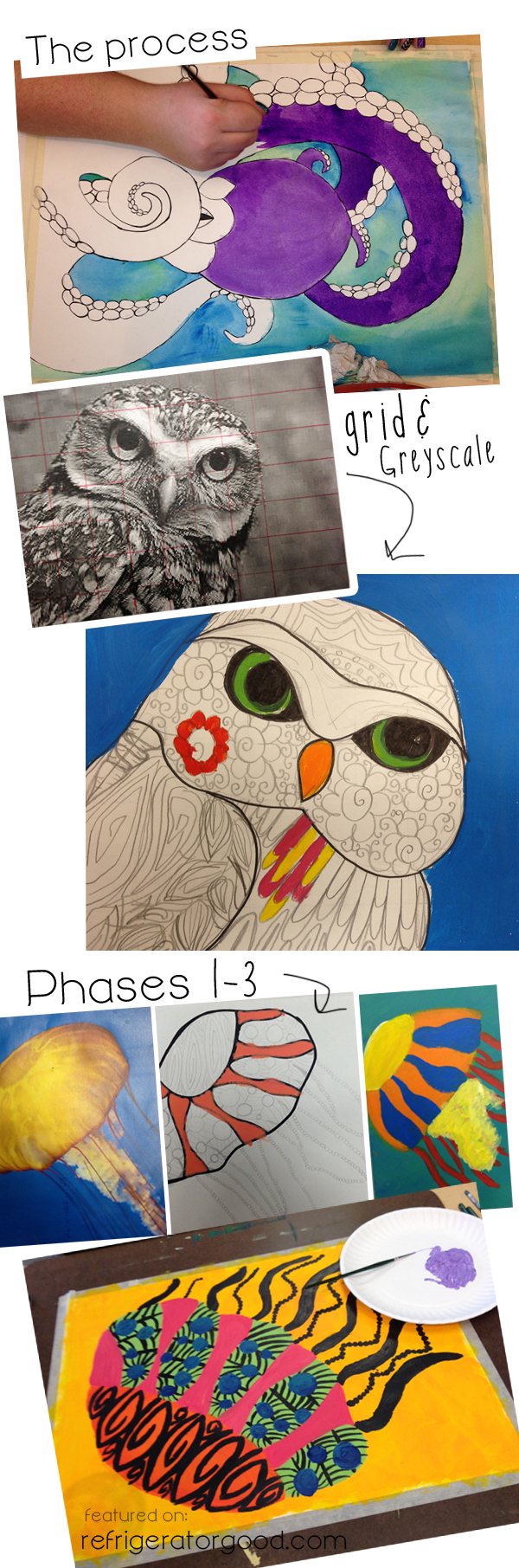
Middle & High School Painting I // Decorative Line Animals


Medium: Acrylic painting
Time: 1-2 weeks
Grade: 9-12  Art II: Intermediate Art class
Objective: Explore impressionism, painting and color
Materials: Canvas, acrylic paint, brushes, water, paper towel.

The Following Lesson is provided by:
ART EDUCATOR: Sabrina Wingren, Spokane Valley, Washington


*CHECK OUT ADDITIONAL LESSON's on Sabrina's Teaching BLOG!*

Sabrina's Teaching Blog: A SPACE TO CREATE.COM {Click here}

Sabrina's High School site: {Click here}
Sabrina's lesson is also available for purchase on her Teacher pay Teacher account: {click here}


www.refrigeratorgood.com
Sabrina's Instructional Technique: "I have students look up an animal of their choice online and have them print it in color and in grayscale. I have them grid the grayscale printout and their final surface. I talk to them about not using paint directly from the tube, but mixing their colors. I also talk about color bias and give the paint accordingly. They do a color plan and a small scale test of colors on a scrap piece of paper before beginning. We talk about rhythm and line and do some Zentangles as a precursor to this lesson." Sabrina Wingren


www.refrigeratorgood.com


      Teacher: Sabrina Wingren
      Class: Art I
      Grade: 6-12
      State: Washington
      Teachers Blog: [Website]

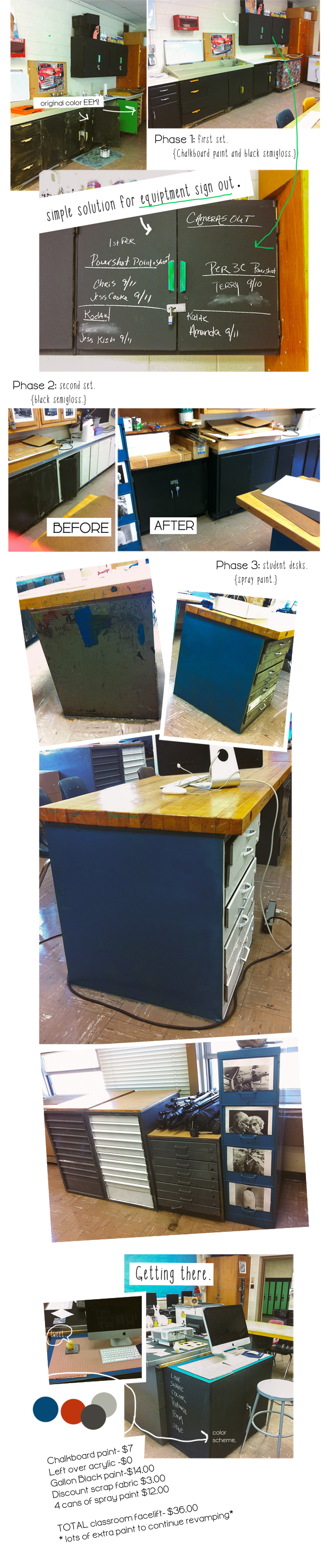
New Room, New year, Fresh paint

So we are into Oct. and the lessons are flowing the kids are learning... Frequent posts are on a bit of delay, but much to share soon.

Starting from the top...
This year brought a new photo curriculum, 3 newly revamped courses, and a old fantastic classroom that needed some love. With a <$40 budget- my classroom received a much needed facelift .. in early September.
The beginning stages are complete, but the process of making this photo studio "aesthetically pleasing" and user friendly for the kids continues..
Check out the progress thus far.

rg_new
Pin It button on image hover